Buying through an affiliate link on Substrate & Stem may earn us a commission at no added cost to you. How affiliate links fund this site
The switches underneath your keycaps define your keyboard's personality. They determine how much resistance your fingers encounter, whether your keystrokes register with an audible snap or a muted thud, and how stable the keys feel under off-center strikes. However, choosing switches involves more than selecting a color profile; your board's circuit design, plate layout, and socket construction dictate what physically fits.
Whether you are replacing worn keys on a prebuilt board or tuning a custom deck for quiet office typing, this guide outlines the operational differences between primary switch architectures and details what to verify before purchasing replacement hardware.
- Pin Architecture: 3-pin (plate-mount) switches fit almost every hot-swap socket. 5-pin (PCB-mount) switches offer extra alignment stability but require matching guide holes in your printed circuit board (PCB).
- Mechanical Feedback: Choose linear for uninterrupted vertical glide, tactile for a physical bump at actuation, or clicky if you need audible confirmation alongside a crisp drop.
- Socket Clearances: Certain hot-swap keyboards (notably budget boards with narrow Outemu contact sleeves) accommodate only narrow metal pins, whereas universal Kailh-style sockets accept thicker pins.
The Three Fundamental Switch Behaviors
While mechanical switches share a common enclosure layout—stem, upper housing, spring, contact leaf, and base housing—the geometry of the stem legs and contact mechanism splits them into three primary operational categories:
| Behavior | Traditional Color Codes | Physical Sensation | Acoustic Profile |
|---|---|---|---|
| Linear | Red, Black, Yellow | Smooth, uniform resistance from top of press down to bottom-out. | Muffled clack derived solely from housing impact. |
| Tactile | Brown, Clear, Purple | Distinct resistance peak (bump) near actuation point before dropping. | Moderate clack with subtle slider friction tone. |
| Clicky | Blue, Green, White | Sharp mechanical break as an internal click jacket or click bar releases. | High-pitched, deliberate metallic and plastic snap. |
Beyond standard actuation curves, silent switches incorporate internal silicone or elastomeric dampeners along the stem rails. These pads cushion both the downward stroke when the stem hits the floor and the upward reset stroke when the spring returns the stem to the roof, drastically cutting down reverberation in open-plan workspaces.
Hardware Standards: 3-Pin vs. 5-Pin Mounts
Before ordering replacement switches, remove a single switch from your keyboard to examine its underside. Mechanical switches follow two standard mounting formats:
- 3-Pin (Plate-Mounted): Features one central plastic stabilizing post and two conductive metal pins. The keyboard's metal or polycarbonate switch plate provides primary structural alignment, preventing keys from twisting.
- 5-Pin (PCB-Mounted): Features the center post, two metal pins, plus two additional plastic alignment pins on outer wings. If your PCB lacks the corresponding two guide holes, 5-pin switches will not seat flush unless those plastic legs are clipped off with flush cutters.
Budget MX-Compatible Replacement Switches
When repairing a single dead key or outfitting a complete budget keyboard, standard 3-pin packs offer broad compatibility across mainstream hot-swappable boards.
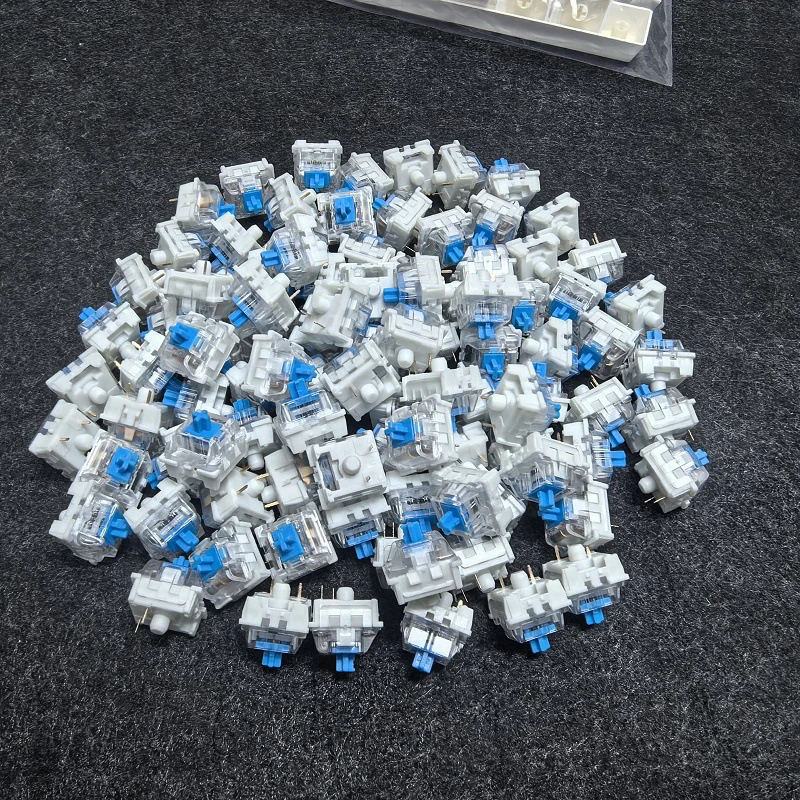
Verify PCB switch socket pin count (3-pin vs 5-pin) and LED orientation prior to purchasing Cherry-profile switch sets.
The generic 3-pin switch listing highlighted above presents standard cross-stem components advertised in traditional color profiles (Blue, Red, and Brown). Because these omit extra mounting pegs, they insert directly into standard 3-pin and 5-pin hot-swap boards alike. However, because manufacturer branding is not designated in the listing details, internal spring rates and housing tolerances are unspecified. They serve best as economical spares for functional repairs rather than customized acoustic builds.
Dustproof Enclosures and Boxed Stems
Key stability during rapid or off-axis keystrokes depends heavily on stem tolerancing. Conventional MX stems feature an exposed cross, whereas "dustproof" or boxed stems surround the central cross with plastic perimeter walls.

Verify PCB switch socket pin count (3-pin vs 5-pin) and LED orientation prior to purchasing Cherry-profile switch sets.
Pictured with Outemu branding and perimeter wall stems, this listing provides enclosed slider designs advertised to inhibit particulate entry into the contact cavity. Dustproof shrouds can also minimize keycap wobble when pressing keys near their corners. Note that while the listing title mentions clicky, linear, tactile, and silent options across various quantities (such as 30 or 70 pieces), individual pack counts and switch behaviors must be confirmed at checkout, as exact specifications differ across seller dropdown variants.
Factory-Lubricated and Silent Switches
Standard mechanical switches generate sound not only at bottom-out, but also from internal spring ping and leaf resonance. Silent variants solve this by integrating physical dampening pads directly into the stem mold.

Verify PCB switch socket pin count (3-pin vs 5-pin) and LED orientation prior to purchasing Cherry-profile switch sets.
The Outemu Silent V3 listing highlights factory pre-lubrication, a PA66 nylon housing, a POM stem, and silent silicone strips. The seller advertises both linear (Silent Peach V3) and tactile (Silent Lemon V3) variants. Both are 5-pin configurations with integrated light-guide columns intended to route surface-mount LED illumination through the opaque housing. Before buying this 5-pin design, inspect your keyboard's PCB to confirm it contains the two extra alignment holes on either side of the center post; otherwise, careful pin clipping will be necessary to seat the switch flat.
Switch Removal, Swapping, and Maintenance Tools
Never pull keycaps or hot-swap switches using pliers, screwdrivers, or bare fingers. Doing so risks cracking switch housings, tearing keycap stems, or ripping hot-swap sockets off the PCB traces.
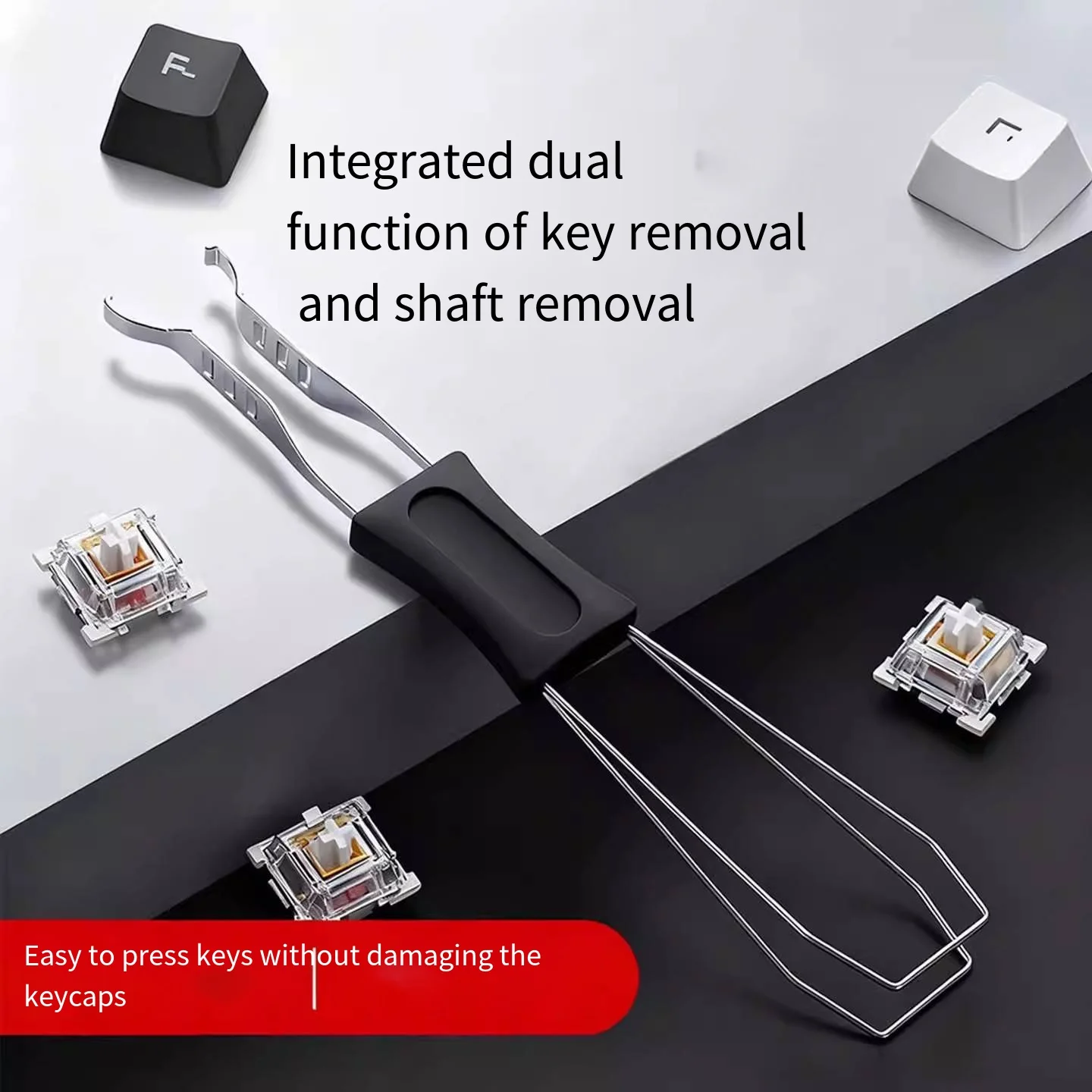
Verify PCB switch socket pin count (3-pin vs 5-pin) and LED orientation prior to purchasing Cherry-profile switch sets.
A dual-ended tool combining a wire keycap puller with a stamped steel switch extractor prevents accidental cosmetic and structural damage. The wire loop expands over standard keycaps to grip them from beneath the skirt, applying balanced upward force. On the reverse end, the switch puller features hooked metal prongs shaped to depress the retaining clips located on the north and south edges of the switch housing.
- Disconnect Power: Always unplug your keyboard before pulling switches to prevent electrical shorts across contact pads.
- Compress Retention Tabs: Hook the switch puller prongs against the top and bottom latches of the switch housing. Squeeze gently to retract the plastic clips holding the switch into the plate.
- Pull Straight Up: Lift perpendicular to the plate. Wiggling side to side can bend metal switch pins or damage the plate cutouts.
- Inspect Pins Before Seating: Ensure both copper pins on the new switch are completely straight. Insert the switch straight down until it clicks securely into the mounting plate.
Pre-Purchase Compatibility Checklist
Before purchasing replacement packs, verify these physical factors against your keyboard hardware:
- PCB Socket Type: Universal hot-swap sockets (such as Kailh, Gateron, or TTC) accept both thick and thin switch pins. Proprietary or low-cost Outemu sleeve sockets fit only thin metal pins; standard pins from other brands may bend or fail to insert without modification.
- Backlight Architecture: If your board uses raised through-hole LEDs protruding above the PCB, your replacement switches must feature open housing slots underneath the stem. Surface-mount (SMD) LEDs flush with the PCB work best with transparent housings or built-in light-guide columns.
- Key Count Math: Compact layouts (60% to 75%) require between 61 and 84 switches, tenkeyless (TKL) boards need 87, and full-size layouts require 104 to 108. Always buy a small surplus to account for bent pins or accidental damage during assembly.
Evaluation is based on published specifications and seller listings. No physical or hands-on testing was conducted; unlisted specifications may still be available from the seller.
